


When we first released the Secret Flying Fuel Dumping Tool, we received many requests for more detailed instructions on how to use it.
This guide walks you through the entire process, from choosing a flight to testing potential strikes and identifying a successful fuel dump.
Before you begin, we strongly recommend reading: Fuel Dumping: The Basics
Before You Start
There are a few important things to understand:
- Not every flight is dumpable. In fact, only a small percentage of fares can be successfully fuel dumped.
- Of the fares that are dumpable, most will not work with a 3x strike. 1x strikes are generally much easier to find.
- Some routes simply won’t produce useful results because of the airlines and fare rules involved.
- You may need to test hundreds — or even thousands — of combinations before finding a working strike.
- The Fuel Dumping Tool does not automatically find fuel dumps for you. Its purpose is to dramatically speed up the process of testing large numbers of possible route combinations.
For the best chance of success, we recommend starting with a good candidate fare before using the tool – see here.
Please do not contact us asking for a working strike. Finding them is part of the process, and this tool is designed to make that process considerably faster.
Step 1: Choose the Main Flight
First, decide which flight you want to attempt to fuel dump.
For this example, we’ll use:
Boston → Shanghai → Boston
11 November – 18 November 2026
Enter these details into the Main Flight section of the Fuel Dumping Tool.
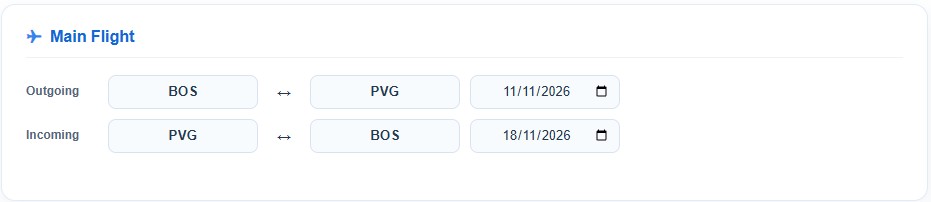
Before continuing, search for the same Boston–Shanghai roundtrip on a booking website and make a note of the normal price. This is important. You’ll use this price later as your baseline to determine whether adding a strike has successfully reduced the fare.
Also make sure that pop-ups are enabled for the Secret Flying Fuel Dumping Tool page. You’ll need this later when opening multiple searches at once.
Step 2: Choose How You Want to Search for Strikes
The Fuel Dumping Tool gives you two ways to search:
- Search all city combinations
Use this option when you don’t already know any strikes and want to search from scratch. The tool will take all the airport codes you enter and automatically create combinations between them.
For this example, we’ll assume we don’t know any working strikes, so we’ll use the Search all city combinations option.
- Search predefined pairs
Use this option if you already know of potential or previously working strikes.
Many strikes work across multiple routes and airlines, so testing known strike pairs against a new main flight can be a very effective way of discovering additional dumpable fares.
Premium Members: Use Our Revealed Fuel Dump Strikes
Premium members have access to the Fuel Dump deals we publish, including the strikes we reveal when we find a working Fuel Dump. You can take these previously successful strikes and enter them into the Search predefined pairs option in the Fuel Dumping Tool.
This can significantly increase your chances of finding a Fuel Dump. A strike that works on one fare can often work on many other flights, routes and airlines around the world. Instead of searching completely at random, you can test strikes that are already known to have worked.
For example, if we reveal SYD-MEL as the strike in a Fuel Dump deal, you can add SYD-MEL to your predefined strike pairs and test it against other fares.
Standard member? Fuel Dump deals and their revealed strikes are available exclusively to Premium members. Upgrade to Premium to get access and start building your own list of proven strikes.
Step 3: Choose a Region for Your Strike Search
Now we need some airport codes to test.
Previously, we recommended using ITA Matrix to identify airports in a particular area. Today, it’s much quicker to use an AI assistant to generate the list.
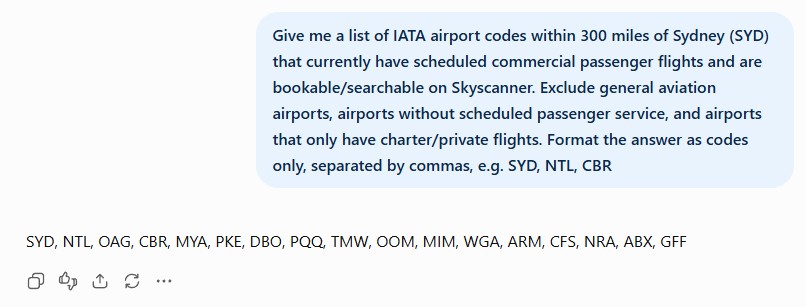
First, choose a relatively small region of the world. For this example, we’ll use South-East Australia. We can then ask:
“Give me a list of IATA airport codes within 300 miles of Sydney (SYD) that currently have scheduled commercial passenger flights and are bookable/searchable on Skyscanner. Exclude general aviation airports, airports without scheduled passenger service, and airports that only have charter/private flights. Format the answer as codes only, separated by commas, e.g. SYD, NTL, CBR”
Why 300 miles?
As explained in Fuel Dumping: The Basics, you generally want the strike to be relatively short and inexpensive.
If the strike itself is a long or expensive flight, adding it to the itinerary could increase the total fare so much that it defeats the purpose of fuel dumping.
The 300-mile figure isn’t a strict rule — it’s simply a useful starting point for finding airports that may produce inexpensive strike combinations.
Step 4: Enter Your Airport Codes
Copy the airport codes and paste them into the Strikes box in the Fuel Dumping Tool.
For this example, we’re looking for a 3x strike, so select the 3x option.
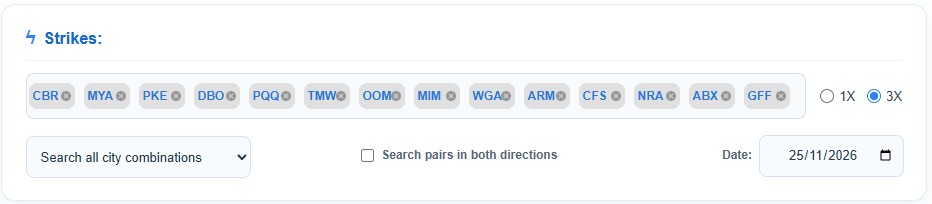
Because we’re searching for a 3x strike, the strike must take place after the main itinerary.
The tool automatically sets the strike date to one week after the return date of your main flight. You can change this date if required.
Step 5: Choose a Booking Website
Select the booking website you want to use from the drop-down menu.
This is where the tool will send each generated route when you begin opening your searches.
Step 6: Calculate the Routes
Now click Calculate Routes.
This is where the Fuel Dumping Tool does the heavy lifting. It will generate all the possible route combinations using the airport codes you entered.
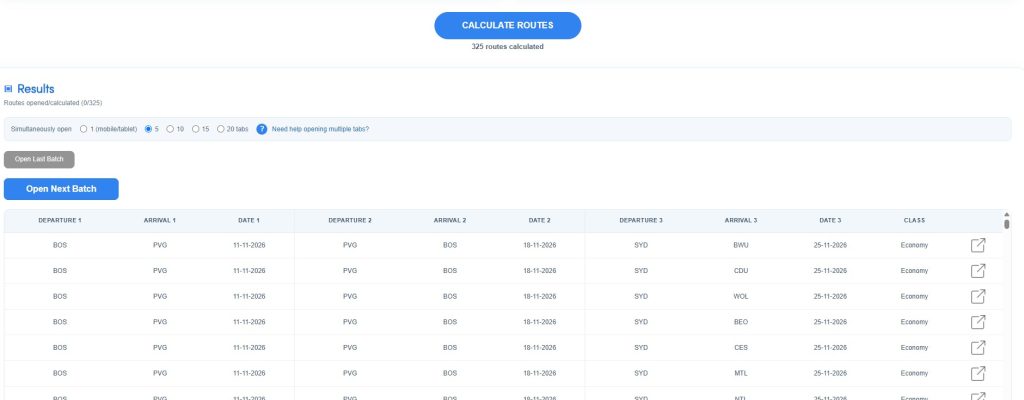
In our 3x example, each result contains three flight legs:
Flight 1: Boston → Shanghai
Flight 2: Shanghai → Boston
Flight 3: South-East Australian city → South-East Australian city
Each third flight is a potential strike that we’re going to test against the main Boston–Shanghai itinerary.
Step 7: Choose Your Batch Size
Before clicking Open Next Batch, choose how many of the routes you want the tool to open at once.
We recommend starting with 5 tabs per batch.
Opening too many tabs simultaneously can:
- Slow down or crash your browser
- Make the searches harder to manage
- Increase the likelihood of triggering Captchas on booking websites
If your computer handles multiple tabs comfortably, you can increase the batch size.
Using a Mobile Device?
Many mobile browsers restrict websites from opening multiple tabs automatically.
If you’re using the Fuel Dumping Tool on mobile, we recommend selecting 1.
Step 8: Allow Pop-Ups
The first time you click Open Next Batch, your browser may open only one tab.
This usually means your browser is blocking pop-ups.
In Chrome, click the pop-up blocked icon in the address bar and select:
Always allow pop-ups and redirects from secretflying.com
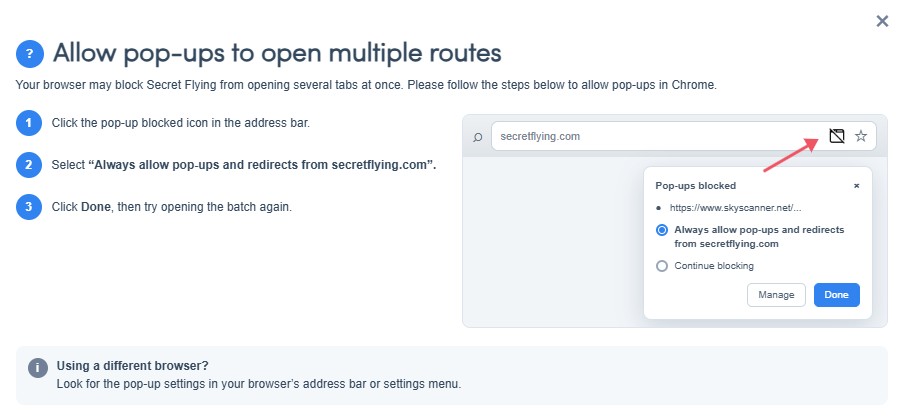
Once pop-ups are allowed, return to the tool and continue.
Step 9: Open Your First Batch
Click Open Next Batch.
The tool will open the selected number of itineraries in separate browser tabs.
Routes that have already been opened will be highlighted green, while routes that haven’t yet been opened will remain white.
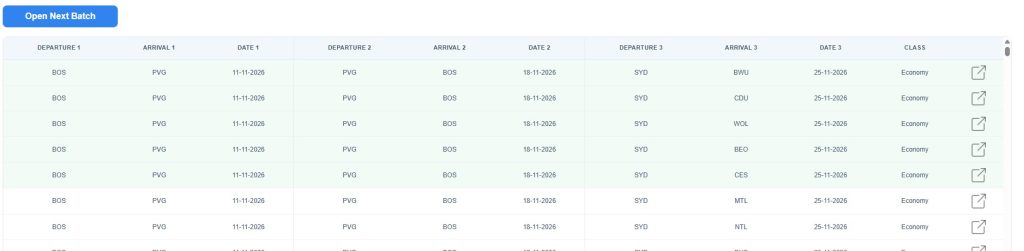
This makes it easy to keep track of your progress, even when you’re testing a large number of combinations.
Step 10: Check the Prices
Allow all the booking pages to fully load.
Now compare the prices you’re seeing against the normal Boston–Shanghai roundtrip price you recorded at the beginning.
Once you’ve checked the entire batch, close those tabs before opening the next batch.
Then return to the Fuel Dumping Tool and click Open Next Batch again.
Step 11: Continue Through the Results
Repeat the process:
Open batch → Allow pages to load → Check prices → Close tabs → Open next batch
Continue working your way through the generated routes.
After enough searches, the booking website may display a Captcha asking you to confirm that you’re human.
Complete the Captcha normally.
You can then use Open Last Batch to reopen the searches that failed to load correctly.
Step 12: Look for a Significant Price Drop
This is what you’re looking for.
As you check each itinerary, compare its total price with the normal price of the original Boston–Shanghai roundtrip.
If adding one of the strikes causes the overall ticket price to become significantly cheaper, you’ve potentially found a working fuel dump.
Make a note of the strike.
A successful strike may work with other routes, airlines or fares, making it useful for future searches.
Not Every Fuel Dump Is 100%
A working strike doesn’t necessarily eliminate the entire fuel surcharge.
For example, you may find a strike that dumps:
25% of the fuel surcharge
50% of the fuel surcharge
75% of the fuel surcharge
100% of the fuel surcharge
Partial dumps can still produce excellent savings.
But the ultimate find is a strike that removes 100% of the fuel surcharge — particularly when it’s a 3x strike.
Saving and Reusing Strikes
We’ve made it easy to paste previously discovered strikes directly into the tool rather than entering them individually.
For Search all city combinations, use this format: NYC, BOS, PHL, WAS
For Search predefined pairs, use this format: NYC-BOS, NYC-PHL, BOS-PHL
Keeping your own list of previously successful strikes can make future searches considerably faster.
A Final Reminder
Fuel dumping requires patience.
Not every route is dumpable, and even a normally dumpable fare may not work on every date.
There will be times when you search through hundreds — or even thousands — of combinations without finding anything useful.
That’s normal.
Your chances improve considerably when you begin with a fare that is already a good candidate for fuel dumping.
For best results, first find a good candidate fare before using the Fuel Dumping Tool.
Most importantly, remember what the tool is designed to do:
The Secret Flying Fuel Dumping Tool does not find fuel dumps for you. It allows you to test a huge number of possible strikes far more quickly than searching for each combination manually on a booking website.
Finding the winning combination is still up to you.
Enjoy your new hobby.
 [adblockingdetector id="638efa67113bf"]